


WordFinder by YourDictionary
4.51.63K Reviews
App Specs
- Version
- 7.8.16
- Updated On
- License
- Free
- Downloads
- 500,000+
- Developer
- LoveToKnow Media
- Categories
- Word
- Platform
- Android
Screenshots

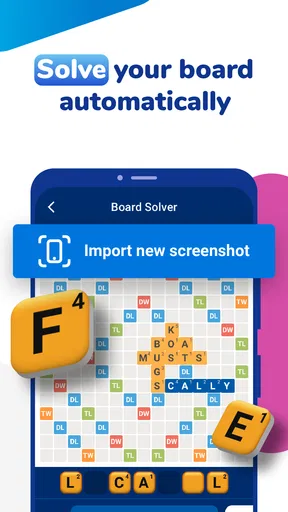
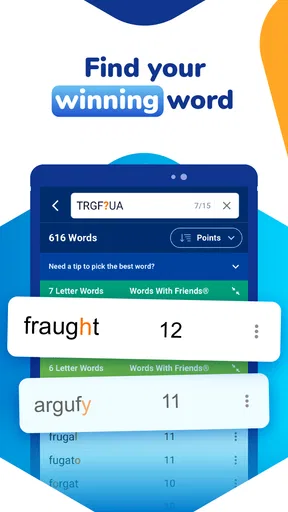
 Analysis by AppCompare
I like word games most when the challenge is finding a clever play, not staring at a rack of letters until the timer runs down. WordFinder by YourDictionary is built for that stuck moment: it helps you explore possible words for games such as Scrabble and Words With Friends. I see it as a practical companion for players who want a nudge, though how you use that help matters as much as the answers it finds.
What the free option means in practice
WordFinder is free to download, and optional in-app purchases are listed from $0.99 to $29.99 per item. That makes it easy to try without paying upfront, but the range alone doesn’t tell me which purchase suits a particular player. I’d start with the free experience and decide whether any paid option addresses a real annoyance or need before spending.
The distinction is useful: free access gives you a way to test whether this kind of word helper fits your routine, while paid value depends on what you personally want from it. If you only open a solver once in a while, paying may not add much to your enjoyment. If you play frequently and find the app genuinely useful, you can weigh the available purchase choices for yourself rather than treating an upgrade as essential.
Where the helper earns its place
The strongest value is convenience. Instead of juggling a general web search, a word list, and your game board, you can use a dedicated tool to investigate letters and word patterns. That is most helpful when you already have a candidate in mind but need to check whether your tiles can make something better, or when a fixed board position narrows the possibilities.
There is a trade-off, though: getting an answer can end the puzzle before you have worked it out. I get more from a solver when I treat it like a study aid—checking a word after trying several combinations, then noticing how its letters fit—rather than entering every rack immediately. That small habit makes the tool useful without letting it do all the thinking.
Unleashing the Power of Words
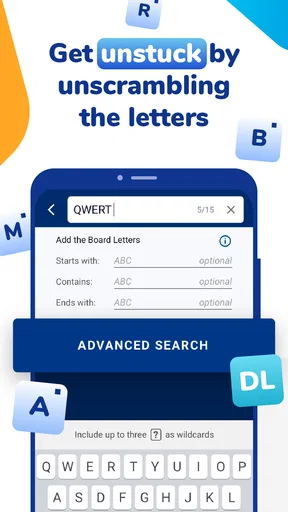
When I first opened WordFinder by YourDictionary, I was immediately impressed by its clean and intuitive interface. It's designed to get you straight to the point, which is finding words. The app boasts a powerful search engine that lets you find words based on specific letters, length, and even the position of certain letters. This is a lifesaver when you're staring at a jumble of tiles and just can’t seem to make anything work.
Features That Make a Difference
The app is packed with features that cater to both casual players and serious word enthusiasts. You can use it for a quick win or dive deeper to enhance your vocabulary. Here are some features that stood out to me:
Worth Reading Before You Choose

Flipboard Shows What News Apps Must Do Beyond the Feed

Switching to Android Auto Means Rethinking Your Driving Routine

Google Calendar Makes a Crowded Week Easier to Manage

Ludo King Makes the Most of the Minutes Between Plans

Baby Panda World Brings Quick Play to Modern Phones, but Its Game Library Feels Busy

ESPN’s Live Game View Makes Following Close Games Easier
- Advanced Search Options: You can search for words that start with, end with, or contain specific letters. This is super handy when you’re stuck with unusual tiles.
- Word Lists: The app includes curated word lists for different purposes, like two-letter words or words with a high score potential in Scrabble.
- Multiple Game Support: Whether you’re playing Scrabble, Words With Friends, or any other word game, the app aligns with the rules of these games to provide valid words.
- Offline Access: You won't need to worry about losing your edge when you’re without internet. The app can function offline, so you can keep playing wherever you are.
Using it without flattening the fun
For a casual game night, I’d keep the app out of sight until a genuine impasse comes up. Imagine friends debating whether a short word fits a tight space: checking a possibility can settle the uncertainty, but consulting the solver for every turn can make the game feel less like a shared contest. Agreeing in advance on whether helpers are allowed is a simple way to avoid awkwardness.
For solo practice, I’d use a different rhythm. First, set a short personal limit and try the rack yourself; then search by the fixed letters on the board, rather than simply asking for every possible play. Looking at the options afterward can show how a prefix, suffix, or awkward tile changes what is available. The useful lesson is often the pattern behind a word, not just the word itself.
One detail worth checking before relying on a suggestion is the game you have selected and the rules you are playing under. A word tool can help generate candidates, but a candidate still needs to fit the board, your tiles, and the word acceptance rules of the particular game. I would verify a surprising suggestion in the game itself instead of assuming that every result will be accepted in every word-game variant.
How it compares with other ways to look up words
Compared with a paper word list, a mobile solver is quicker when you need to filter by several letter constraints. A dictionary is better when your main question is what a word means, how it is used, or whether you want to build vocabulary without focusing on a turn. A general web search can answer broad questions, but it can also send you through unrelated results when all you need is a playable candidate.
That makes WordFinder a specialist rather than a replacement for every word resource. Its appeal is the focused workflow: bring your letters and constraints, then explore possibilities. If your priority is learning definitions or improving spelling in ordinary writing, I’d choose a dictionary or learning tool as the main app and keep this one for game situations.
Who is likely to get the most from it?
I’d recommend trying it if you regularly play letter-tile games, enjoy testing unusual combinations, or want a way to review possible plays after a round. It can also suit a beginner who feels blocked by a rack and wants examples of how a few letters can combine. The free download lowers the commitment for that first test, while optional purchases are a decision to make only after you know what you use.
I would skip it if you prefer solving every turn unaided, dislike using a separate helper during play, or mainly need definitions rather than game-ready word searches. It may also be the wrong fit for a group that values a strict no-assistance game. In those cases, a dictionary for language questions—or simply the game’s own tools and rules—may be a better match.
Everyday use and practical limits
A realistic use is a quick phone game during a commute break: you have a few minutes, a difficult mix of letters, and a board space that calls for a particular length. A targeted search can help you spend that short session playing instead of guessing blindly. If you are somewhere without a reliable connection, the app’s offline capability can also be useful, though I would check that it is ready before setting out rather than discovering a problem mid-game.
There is a balance between speed and confidence. A solver can broaden your options, but it cannot decide which move is strategically best for your board or whether saving a useful letter is wiser than scoring now. I’d compare promising words against the actual board and consider what your next turn might look like. Treating the result as a shortlist, not an instruction, keeps the decision in your hands.
WordFinder is a word game from LoveToKnow Media, aimed at an Everyone audience. It was released on November 21, 2018, and version 7.8.9 requires Android 6.0 or later. It has a 4.5 average from around 6,400 ratings, alongside about 1,600 written reviews and over 500,000 installs. Those figures suggest it has reached plenty of players, but the better test is whether its searches match the way you like to play.
The User Experience
Using WordFinder by YourDictionary is a breeze. The app is lightweight and doesn’t bog down your phone's resources. Navigating through the app is smooth, and everything is laid out to ensure that even the least tech-savvy user can find their way around. I tried it on both Android and iOS, and the experience was seamless across platforms.
The app also offers a premium version, which removes ads and gives access to even more robust features. While the free version is pretty comprehensive, the premium version is worth considering if you’re a hardcore word game player looking to eliminate all distractions.
Is It Worth the Download?
If you find yourself losing game after game or just want to expand your vocabulary, this app is a must-download. It’s not just a tool for winning games; it’s an educational asset. I noticed that after using the app for a while, I started recognizing patterns and learning new words that I could use even outside the game context. It’s a win-win.
From its user-friendly interface to its comprehensive word-finding capabilities, WordFinder by YourDictionary is an app that belongs on every word game enthusiast's phone. Whether you're a casual player or a seasoned wordsmith, this app enhances your gaming experience and helps you learn in the process.
So, if you’re ready to take your word game expertise to the next level, give WordFinder by YourDictionary a try. It might just be the secret weapon you need to conquer your friends in the next game night showdown.
Pros
- Comprehensive word database.
- User-friendly interface.
- Offline mode available.
- Supports multiple languages.
- Helpful for word games.
Cons
- Ads can be intrusive.
- Requires internet for updates.
- Limited free features.
- Occasional lag on older devices.
- No dark mode option.
FAQs for WordFinder by YourDictionary
What is WordFinder by YourDictionary used for?
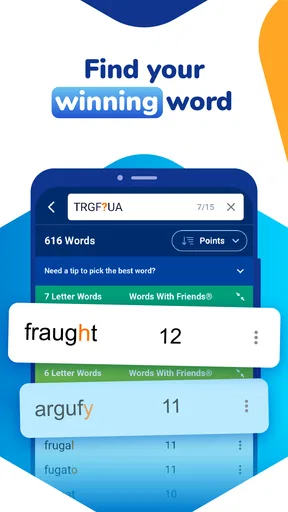
WordFinder by YourDictionary is a versatile tool designed to help users enhance their vocabulary and improve word game skills. It offers features like word lookup, anagrams, and word suggestions for games like Scrabble and Words with Friends. It helps users find the best possible words to maximize their game scores.
Is WordFinder by YourDictionary free to use?
WordFinder by YourDictionary offers both free and premium versions. The free version provides access to basic features, while the premium version unlocks advanced tools like additional word lists and ad-free experience. Users can choose the version that best suits their needs and budget.
How does WordFinder by YourDictionary improve my word game performance?
WordFinder by YourDictionary improves your word game performance by offering a comprehensive database of words and strategic suggestions. It provides tools for finding valid words based on your tiles or letters, enabling you to optimize your moves and score higher points in games like Scrabble and Words with Friends.
Is WordFinder by YourDictionary available offline?
Currently, WordFinder by YourDictionary requires an internet connection to access its full features and regularly updated word lists. This ensures that users always have access to the latest vocabulary and game strategies, although this might be a drawback for those needing offline access.
Can WordFinder by YourDictionary be used for educational purposes?
Yes, WordFinder by YourDictionary can be an excellent educational tool. It helps users expand their vocabulary, learn new words, and understand word usage in different contexts. It is especially useful for students and language learners looking to enhance their linguistic skills in a fun and interactive way.


